
Smarter Workflows, Greater Productivity

One Platform for All Instruments
Control the Mics and Myras from a single interface — simplifying automation across your entire lab.

AI-Guided
Accuracy
Real-time checks, deck validation, and smart recovery with MyraIntelligence™ reduce errors and boost lab confidence.

Reproducibility Made Simple
Automated documentation and built-in traceability ensure consistent, compliant, and reproducible science every time.

Built for Easy integration
Designed to fit right in, Workbench integrates seamlessly with LIMS, APIs, and user management systems — no heavy lifting required.
Welcome to
Workbench 2.0
Workbench 2.0 is Bio Molecular Systems’ next-generation control software that unifies the Mic qPCR Cycler, Myra and Myra9 liquid handlers, and the fully integrated Myra+ system into a single, intelligent environment.
From assay setup to final analysis, Workbench enables researchers to plan, run, and interpret experiments with unmatched precision and ease.
Ready to Streamline Your Lab Workflow with Workbench 2.0?
See how Workbench 2.0 helps you do more science, less admin. Your next-level lab efficiency starts here.
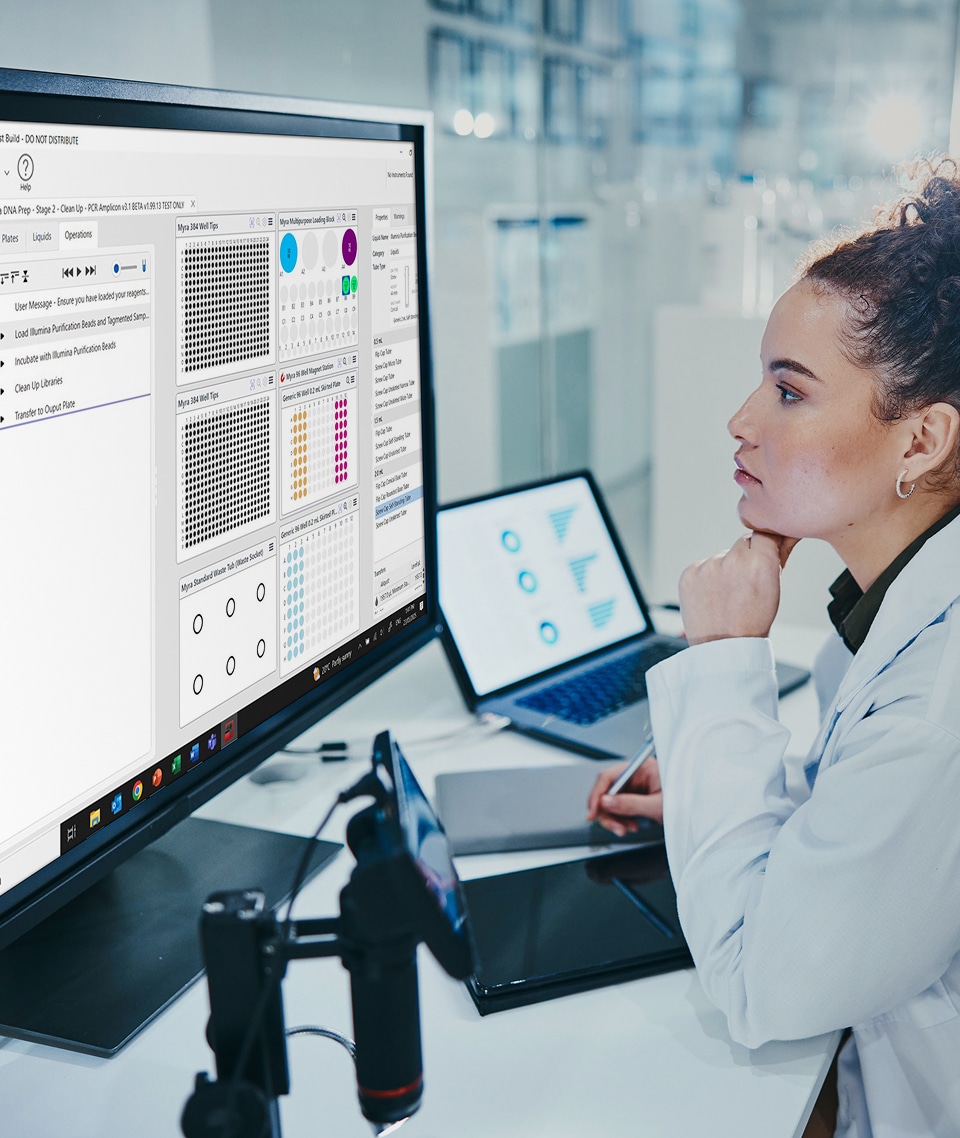
Features
Packed with powerful new features, Workbench 2.0 gives you smarter tools to plan, track, and manage your lab work with ease.
Unified control
Take command of your entire Bio Molecular Systems setup — Mic qPCR Cyclers, Myra Liquid Handling Systems (including Myra9, and Myra+) — from a single, streamlined interface with Workbench.
Flexible workflows
From assay design to data analysis, Workbench lets you tailor every step. Create custom workflows, including script-driven protocols, to suit your lab’s unique needs.
Automated qPCR analysis
Workbench comes with built-in tools for real-time PCR and melt curve analysis — supporting Relative Quantification, HRM, Absolute Quantitation, Genotyping, and Allelic Discrimination with just a few clicks.
NGS-ready
Easily prepare your samples for sequencing with built-in NGS normalization, pooling, and quantification — right inside the platform.
LIMS integration
With dedicated LIMS settings, Workbench is designed for seamless integration with Laboratory Information Management Systems, supporting efficient data tracking and workflow management.
Smart Deck Layout
Navigate your deck with ease using an intuitive interface that features Plates, Liquids, and Operations tabs, plus enhanced grouping and playback tools for streamlined setup and review.
Visual Tools
A built-in camera provides real-time deck visualization for easier calibration and layout checks, while MyraSim lets you simulate protocols before running them — saving time and reagents.
gRPC API support
Need advanced integration? Workbench supports gRPC APIs so you can connect with external software platforms and expand your automation ecosystem.
MyraIntelligence® – AI-Powered Automation.
Workbench 2.0 brings true artificial intelligence to the lab through MyraIntelligence®

MyraSim®
Calculates required volumes and checks protocol feasibility before the run.

MyraVision®
Uses AI and computer vision to verify deck layout and identify missing components.
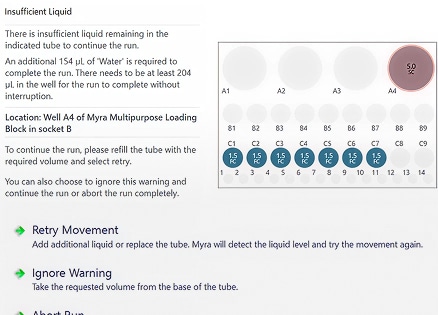
MyraSense®
Monitors liquid levels, adjusts pipetting depth, and detects collisions for automated recovery.
Ready to Streamline Your Lab Workflow with Workbench 2.0?
See how Workbench 2.0 helps you do more science, less admin. Your next-level lab efficiency starts here.
Applications Across Scientific Domains
Workbench 2.0 adapts to your scientific needs across multiple research disciplines — all within a single, flexible software platform.

MyraScripts™ support a broad range of platforms including Illumina, Oxford Nanopore, and PacBio. Whether you’re preparing libraries for WGS, transcriptomics, metagenomics, methylation studies or targeted sequencing, Workbench makes the process fast, reproducible, and reliable.

Myra leads the market in low-volume precision. Automated calculation of dilution, normalisation, and pooling steps improves data quality and reduces cost due to poor cluster density.

Perfectly suited for ultra-low-volume work with systems like BioMark™ Dynamic Arrays, BD Max™ PCR cartridges, Lunatic™ spectro plates, and digital PCR. Avoid air bubbles and misplacement with precision positioning and adaptive pipetting.

Perform ultra-small volume serial dilutions in record time. With the 4-channel head and multidispense, a full MIC plate can be completed in under 5 minutes — ideal for antibiotic resistance research.
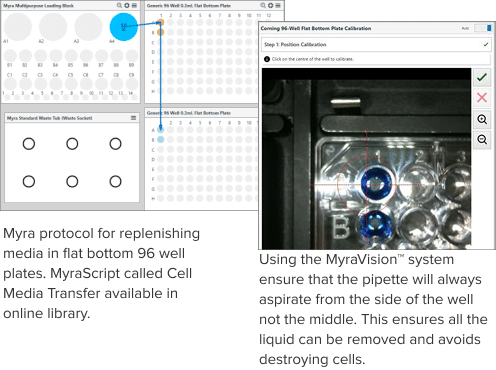
Workbench can use camera-guided pipetting to remove spent media and dispense fresh media without disturbing cells. Adapts to different media types and well geometries.

Support for SBS-compatible slides and flat-bottom dishes ensures precise liquid placement — critical for microscopy and imaging workflows.

Create time-sensitive protocols with low-volume dilutions (as low as 2 µL) for accurate enzyme kinetics. Time-step coordination is built directly into the software — no advanced programming required.

Efficiently transfer or pool small volumes across 1536, 384, or 96-well formats. Multi-dispense options save time while maintaining data integrity.
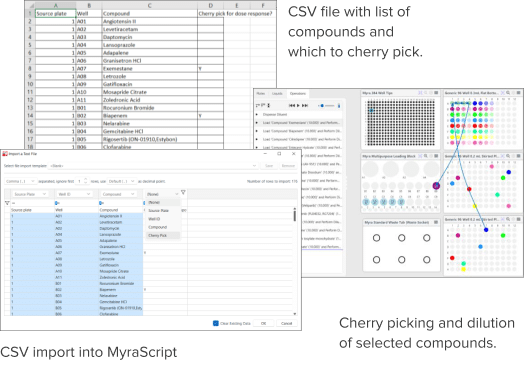
Test costly or exotic compounds at low volumes with high accuracy. Easily set up cherry-pick protocols using intuitive selection tools or imported CSVs.

Accurately pipette and position microlitre volumes of matrix and sample in specific plate regions. Myra ensures reproducibility in MALDI-TOF MS workflows for protein and peptide analysis.

Automate ELISA and antibody staining protocols. Combine Myra with the Mic for advanced qPCR-based protein quantification, including ProQuantum™ (O-link) applications.
Frequently Asked Questions
About Workbench 2.0
What is Workbench 2.0 software and what instruments is it compatible with?
Workbench 2.0 is an integrated, user-friendly software platform that was developed by Bio Molecular Systems to encompass the whole procedure of molecular biology and biochemistry experiments, from the setting up of protocols and designing of assays through their execution and data analysis.
It provides one easy-to-use interface that allows trained lab personnel — i.e., researchers, scientists, and technicians — to execute, set up, and analyze experiments with ease.
Compatible Instruments:
Workbench 2.0 is designed to work seamlessly with Bio Molecular Systems’ suite of instruments, including:
- Mic qPCR Cycler
- Myra Liquid Handling System
- Myra9
- Myra+ qPCR
All instruments and the Workbench software are designated for Research Use Only (RUO) and are intended for use by experienced professionals in molecular biology or biochemical engineering.
What Applications Can Workbench 2.0 Be Used For?
Workbench 2.0 is a high-throughput automation platform for a wide range of life sciences experiments, from genomics and microbiology to drug discovery and proteomics. Workbench 2.0 is capable of operating in close coordination with MyraScripts™ and the Myra liquid handler, providing reproducible, high-accuracy protocols across disciplines.
Genomics
NGS Library Prep
Workbench provides easy, automated Illumina, Oxford Nanopore, and PacBio library preparation. Whether you’re working on WGS, transcriptomics, methylation research, or targeted sequencing, MyraScripts™ get your prep fast, reproducible, and reliable.
Quantification, Normalization & Pooling
Myra leads in low-volume precision, enabling automated dilution calculations, normalization, and pooling. This improves data quality and avoids poor cluster density — critical in sequencing runs.
Microfluidic Prep
Ideal for ultra-low-volume workflows with systems like BioMark™ Dynamic Arrays, BD Max™ PCR cartridges, Lunatic™ spectro plates, and digital PCR. Myra’s precision pipetting prevents air bubbles and misplacement.
Microbiology
Minimum Inhibitory Concentration (MIC)
Quickly perform serial dilutions for antibiotic resistance studies. Myra’s 4-channel head and multidispense complete a full MIC plate in under 5 minutes.
Tissue and Cell Culture Media Exchange
Use camera-guided pipetting to carefully remove and replenish media without disturbing cells — compatible with various well formats and media viscosities.
Slide-Based Dispensing
Supports SBS-compatible slides and flat-bottom dishes, ensuring pinpoint dispensing for microscopy and imaging workflows.
Drug Discovery
Enzyme Kinetics
Design precise time-sensitive protocols with pipetting volumes as low as 2 µL. Workbench enables accurate timing without requiring advanced scripting.
High-Throughput Screening (HTS) & Transfers
Automate small-volume transfers across 96-, 384-, or 1536-well plates. Save time with multidispense features while maintaining reproducibility.
Compound Testing & Cherry Picking
Test low-volume compounds with high accuracy. Use intuitive drag-and-drop or import CSV files to build cherry-picking workflows quickly.
Proteomics
MALDI-TOF MS Sample Prep
Accurately pipette microlitre volumes of sample and matrix into defined plate regions for MALDI-TOF mass spectrometry. Myra ensures reproducibility plate-to-plate.
Immunoassays & Protein Quantification
Automate workflows like ELISA, antibody staining, and qPCR-based protein assays. Pair Myra with Mic for ProQuantum™ or Olink applications.
What are ``Templates`` in Workbench, and how do I create or use them?
Templates are pre-defined sets of instrument configurations in Workbench 2.0 that can be saved, reused, and exported to a variety of Thermo Fisher instruments. Templates are helpful for automating configuration, providing consistency in a group of devices in a fleet, and reducing setup time — especially useful in networked monitoring systems or multi-site implementations.
What Can Templates Include?
Templates can store:
- Instrument operating parameters (e.g., flow rates, alarm thresholds)
- Data logging intervals
- Calibration settings
- Communication configurations (e.g., IP address, port settings)
- Display preferences and units
How to Create a Template in Workbench 2.0
- Connect to an Instrument
Open Workbench and connect to a compatible instrument via USB, Ethernet, or serial connection. - Configure the Instrument
Set up all desired parameters manually. - Create the Template
- Navigate to the “Templates” tab or select “Save As Template” from the settings menu.
- Give the template a name and optional description.
- Save the file locally or to a shared directory.
How to Use a Template
- Connect to a New Instrument
Launch Workbench and connect to the target device. - Apply the Template
- Go to the Templates menu.
- Choose “Load Template” or “Apply Template”.
- Select the desired template file.
- Workbench will apply all stored settings to the connected instrument.
- Verify Settings
Review and confirm that all parameters are correctly applied.
Benefits of Using Templates
- Speeds up deployment of new instruments
- Reduces human error and configuration inconsistencies
- Ideal for large-scale environmental monitoring networks
- Simplifies backup and recovery of instrument settings
Can Workbench 2.0 be integrated with LIMS?
Yes, Workbench 2.0 can be integrated with a LIMS (Laboratory Information Management System) through file-based import and export.
You can also bring in sample and assay data from your LIMS into Workbench as .csv, .tsv, or .txt files. Such files populate the Sample Editor in Workbench, where fields such as Well, Sample Name, Assay, Concentration, etc. can be mapped and used to ready a qPCR run.
On finishing the run, results can be imported to LIMS in .csv or .xlsx. Metadata can also be appended through the LIMS Settings in Workbench to include custom key-value pairs in the run file for traceability or archiving.
This two-way integration supports streamlined sample tracking and data management, particularly when using Myra for qPCR setup and Mic for amplification and analysis.
Can I import my worklists?
Yes, you can import worklists into Workbench 2.0 using the CSV import feature, which streamlines qPCR setup, normalization, pooling, and transfers.
Depending on the workflow, different data can be imported:
- Sample names and loading positions via the “Import sample data from a file” option
- Component details for qPCR Setup, Normalization, Pooling, and Transfer using the “Fill wells according to information from a CSV file” option
- In the Reaction Driven qPCR Setup, both Components and Templates can be imported in the same way
To import:
- Click the Import icon in the toolbar
- Select your CSV file
- Use the Import Configuration window to map your CSV columns to Workbench fields
- Choose whether your input format is Plates or Tubes
- Optionally, save the configuration as a template for future imports or load a previously saved one
This feature saves time and improves accuracy when working with complex experimental setups.
AI Features
What is MyraSim?
MyraSim is the expert AI assistant, designed to help you plan your liquid handling runs with confidence. It dynamically calculates the optimal volumes needed, analyzes each step for potential issues, and provides real-time suggestions to optimize performance — ensuring your workflow is efficient, accurate, and error-free before you ever press start.
What is MyraVision?
MyraVision brings intelligent visual assurance to your workflow. Using advanced computer vision and AI, it automatically scans the deck to verify consumables, detect missing plasticware and confirm cap removal — so every run starts with confidence. MyraVision inspects each section in detail, identifying potential issues as plate or tube failures and providing clear visual feedback. Compatible with most standard labware, it adds a powerful layer of clarity and quality control to your setup.
What is MyraSense?
MyraSense delivers precise control with every drop. Using pressure-based liquid level sensing, it ensures secure and accurate pipetting throughout your workflow. Real-time optimization of mix types, liquid levels, and tube types enables intelligent calibration on the fly. Smart tube height probing minimizes collision risk and reduces setup time, while automated run recovery protects against unexpected interruptions. With MyraSense, every run is backed by precision and reliability.
How Do All 3 Work Together Within Workbench 2.0?
MyraSim, MyraVision, and MyraSense together form an integrated system within Workbench 2.0 to enhance the accuracy, speed, and reliability of the Myra liquid handling instrument:
- Within Workbench 2.0, MyraSim runs in the background as your AI co-pilot — analyzing protocols, predicting issues, and delivering real-time optimizations to ensure every run is set up for success before it begins.
- Within Workbench 2.0, MyraVision provides real-time visual validation of your deck layout — ensuring MyraSim runs are based on accurate, verified setups before any protocol is executed.
- Integrated directly into Workbench 2.0, MyraSense delivers live feedback on liquid levels, tube types, and heights — feeding into MyraSim to simulate precise, collision-free workflows with minimal calibration.
All together, they provide a more intelligent, more powerful automation experience — allowing you to minimize mistakes, accelerate setup, and run complicated Kinase Assays with confidence on a broad spectrum of life science applications.
Using Workbench 2.0
Can Workbench 2.0 run on Apple Mac systems?
No, Workbench 2.0 is currently designed for Windows operating systems only.
However, Mac users can install it using:
However, Mac users can install it using:
- Boot Camp (Intel-based Macs only). Enabling your computer to alternate between booting macOS and Windows partitions.
- Virtual machines (e.g., Parallels, VMware Fusion or Oracle VM VirtualBox) to run Workbench on a Mac without rebooting.
What are the minimum system requirements for installing Workbench 2.0 software?
To install and run Workbench 2.0 effectively, your PC must meet the following minimum requirements:
- Operating System: Windows® 10, 64-bit (English version)
- Processor: Intel® Core™ i5, Core™ 3, Core™ Ultra 3, or equivalent AMD processor
*(Note: ARM-based CPUs like the Snapdragon family are not supported) - Memory (RAM): 8 GB minimum (16 GB recommended)
- Hard Drive: At least 3 GB of free space
- Display: 1080p screen resolution
- Ports: At least one USB port
- Additional Software: Adobe® Reader® (required for viewing PDF reports)
Optional: Microsoft Excel may be needed for exporting and viewing data in .xlsx format.
These requirements ensure stable performance and compatibility with Myra liquid handling and Mic qPCR systems.
Do I need to know Python scripting?
No, Python scripting is not required to use Workbench 2.0. The software comes equipped with a simple-to-use graphical user interface (GUI) by which you can configure workflows, run experiments, and export results — no programming required.
If you need a specific workflow, just have us your Instructions for Use (IFU), and we can develop a MyraScript™ tailored to your requirements.
We also provide API documentation for Python users who want to do more advanced customization or integration with external systems like LIMS — but you will have to do it yourself.
Ready to Streamline Your Lab Workflow with Workbench 2.0?
See how Workbench 2.0 helps you do more science, less admin. Your next-level lab efficiency starts here.